Tables (Edexcel IGCSE Ict)
Exam board Pearson Edexcel · IGCSEUpdated 2024-06-27
Spec point —
6.1.3
Tables
How do you create a table?
- Tables are created by specifying the desired number of rows and columns
- This can typically be done through a menu option or manually typing them in, or by dragging the cursor to the desired table size
How can a table be edited and formatted?
-
Tables can be edited in several ways:
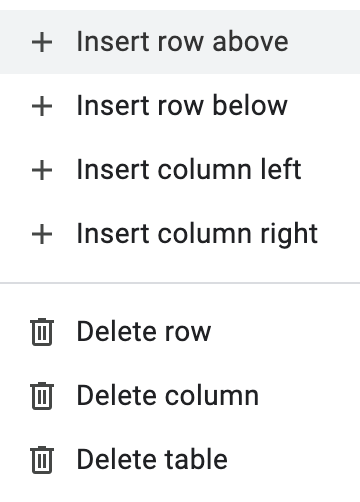
- Insert rows and columns allows the user to add more rows or columns to your table
- Delete rows and columns allows the removal unnecessary rows or columns
- Merge cells allows the user to join two or more cells into one
- Tables can be formatted to improve readability and visual appeal
-
There are multiple options for formatting a table, some of these include:
- Set horizontal cell alignment
- Set vertical cell alignment
- Showing/hiding cell borders
- colouring of the background of a cell
- Adjusting the row/height width
Was this revision note helpful?
Build on this topic