Outputs (Edexcel IGCSE Ict)
Exam board Pearson Edexcel · IGCSEUpdated 2024-06-26
Database outputs
Spec point —
6.2.7
What is a database output?
- A database output is often done through reports
- Reports can be formatted and **customised **to display data in a user-friendly manner
- Reports should** display all the required data and labels** in full
- For example, if you're creating a sales report, it should include all relevant fields, like product name, quantity sold, and total sales
Using appropriate headers and footers
-
Report header
- This appears at the beginning of the report
- This is typically where you would put the report title and other introductory information
-
Report footer
- This appears at the end of the report
- This is where you might put summary or conclusion information
-
Page header
- Appears at the top of each page
- This might contain the page number and the date
-
Page footer
- Appears at the bottom of each page
- This might also contain the page number and the date
Producing different output layouts
- You can control the display of data and labels in your report
- For example, you might choose a tabular format, where data is arranged in rows and columns, or a columnar format, where each data field is listed vertically
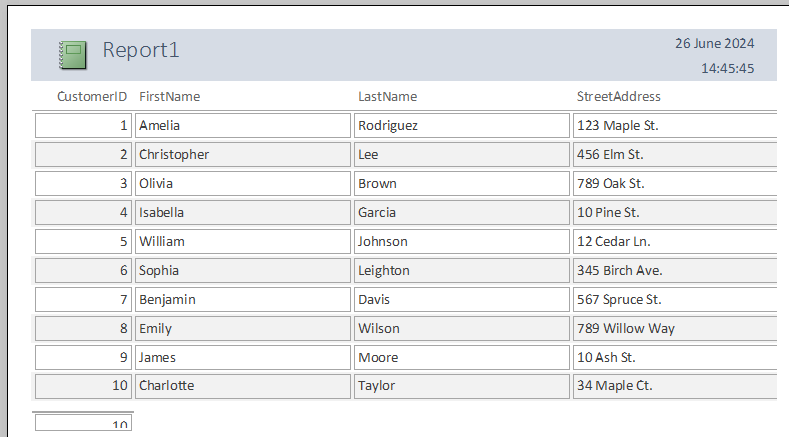
Simple report layout with data in rows
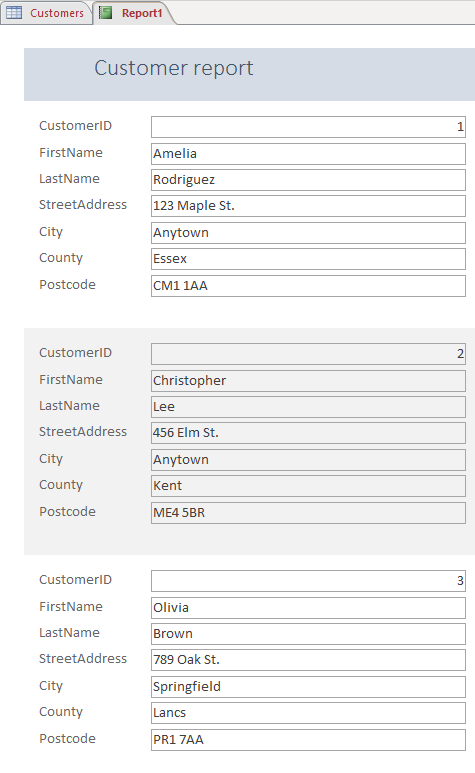
Simple report layout with data shown in columns
Aligning data and labels
- Data and labels should be aligned appropriately
- For example, numeric data is often right-aligned, and decimal points should be aligned for easy comparison
Controlling the display format of numeric data
- You can control the number of decimal places displayed, the use of a currency symbol, and the display of percentages
- For example, a total sales field might be displayed with two decimal places and a currency symbol
Was this revision note helpful?
Build on this topic