Email (Cambridge International IGCSE ICT)
Spec point —
10.1.1
What is email?
-
Email is a method of exchanging messages and files over the internet
-
The main uses of email are:
- Personal communication
- Professional correspondence
- Marketing
-
Companies provide guidelines about acceptable use of emails
-
Guidelines about emails from a company include:
- Purpose of the email
- Using acceptable language
- Email security, including anti-virus software
Email Guidelines & Constraints
Acceptable Language Guidelines
-
Acceptable and appropriate language must be used depending on the recipient and purpose of the email
-
An example of this includes using a professional tone when sending a work-related email
-
No offensive or obscene language or images should be used
-
No racism or violent content should be in email messages
-
No illegal material should be sent
-
The laws within a country can see that emails are monitored and people can be punished for what they write
-
Some additional rules to follow regarding email language include:
- Include a clear subject line
- Use a professional email address
- Use professional salutations
- Do not use all capitals as it implies shouting
Need for Security
- Email security is crucial to protect sensitive information from being accessed or altered
- Email inboxes should be protected by strong passwords which are frequently changed
- Spam filters and antivirus software should be in place at all times to protect users' inboxes from both passive attacks and active attacks
Netiquette
-
Netiquette (Internet etiquette) is the need to respect others online
-
It is an agreement to respect the opinion of others in online forums, internet messages and emails
-
Some common examples to remember are:
- Most posts are public and can potentially be read by anyone
- A clear, inoffensive and succinct language will be used
- Give a good impression of yourself, considering, the tone of writing, spelling, punctuation and grammar
Sending Emails
Email Groups
- Email groups allow for mass communication with a defined set of recipients
- It is easier to send out multiple emails if the addresses are grouped together
- The benefit of doing this is that it ensures no one misses out on an email containing key information
- A drawback of email groups is that spammers can utilise them to target a large group of people with ease
Email Operations
-
There are three key email operations to be aware of:
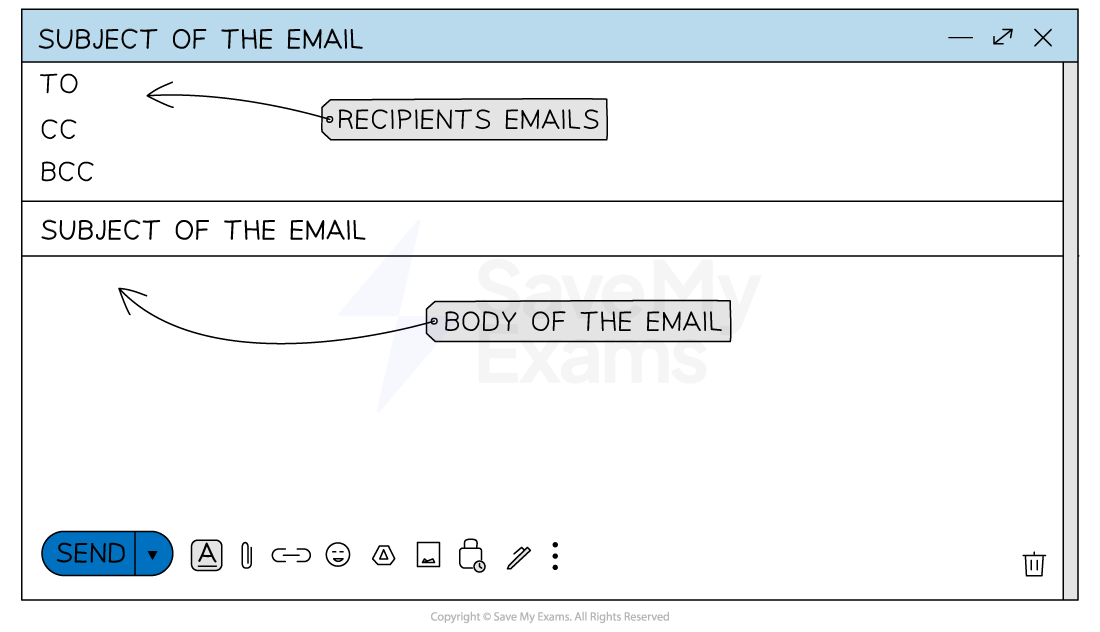
- Carbon Copy (CC) - this is used when you want to include additional recipients to view the email
- Blind Carbon Copy (BCC) - this is used when you want additional recipients to view the email without other recipients knowing
- Forward - This allows you to send an existing email to a new recipient
- Attachments - These allow files to be sent along with the email message
Spam
What is spam?
- Spam is unwanted/unsolicited junk mail which is sent in large numbers to inboxes
- Spam fills the users' inboxes, often with advertising content or for phishing/spreading malware
- Phishing emails will be used to act as a reputable company or organisation in the aim of getting your personal details such as usernames and passwords
How can spam emails be detected?
-
Spam emails often has multiple spelling or grammatical errors
-
They often use broken English, though this is now improving with the use of AI
-
Spam emails will not address you by name
-
Often spam emails will ask you to enter your details by clicking a link
- Reputable companies have now stopped doing this to make identifying spam a lot easier
How can spam emails be prevented?
-
Preventing spam emails is becoming easier as email providers' anti-spam filters become stronger and more efficient
-
Users can ensure they do not agree to marketing emails from companies they register with
-
Users can also ensure they do not reply to emails with sensitive data or complete online forms for websites by clicking links in an email
- Instead, they should visit the website of their own accord and then log in as usual
Worked Example Describe the ways that a user can recognise spam and methods to help prevent it. [6]
How to answer this question:
Give a maximum of 4 bullet points on how users can recognise spam content and then a maximum of 4 points on how they can prevent spam content.
Final answer: Answers:
Final answer: Recognising spam (max 4):
- Multiple spelling/grammatical errors
- Asked to carry out tasks immediately such as click on a link
- Does not ask for you by name
- Stored in a SPAM folder
- Email asks for personal information
- Large amount of repeated emails from the same user
- Lots of other similar email addresses in the send-to-box
Final answer: Prevention methods (max 4):
- Use a spam filter
- Not filling in your details on the online form
- Not replying to spam emails
- Not having an auto-reply set
- Not consenting to marketing when providing details to a company
Was this revision note helpful?