Cyber Security Threats (Cambridge International IGCSE Computer Science)
Forms of cyber security threat
-
Computers face a variety of forms of attack and they can cause a large number of issues for a network and computers
-
The main threats posed are:
- Brute-force attacks
- Data interception & theft
- DDos attack
- Hacking
- Malware
- Pharming
- Phishing
- Social engineering
Brute Force Attack
Spec point —
5.3.1· "1 Describe the processes involved in, and the aim of carrying out, a range of cyber security threats"
Brute Force Attack
What is a brute-force attack?
-
A brute force attack works by an attacker repeatedly trying multiple combinations of a user's password to try and gain unauthorised access to their accounts or devices
-
An example of this attack would be an attacker finding out the length of a PIN code, for example, 4-digits
-
They would then try each possible combination until the pin was cracked, for example
- 0000
- 0001
- 0002
-
A second form of this attack, commonly used for passwords is a dictionary attack
-
This method tries popular words or phrases for passwords to guess the password as quickly as possible
-
Popular words and phrases such as 'password', '1234' and 'qwerty' will be checked extremely quickly.
Data interception
Spec point —
5.3.1· "1 Describe the processes involved in, and the aim of carrying out, a range of cyber security threats"
Data interception
What is data interception & theft?
- Data interception and theft is when thieves or hackers can compromise usernames and passwords as well as other sensitive data
- This is done by using devices such as a packet sniffer
- A packet sniffer will be able to collect the data that is being transferred on a network
- A thief can use this data to gain unauthorised access to websites, companies and more
DDos Attack
Spec point —
5.3.1· "1 Describe the processes involved in, and the aim of carrying out, a range of cyber security threats"
DDoS Attack
What is a DDoS attack?
- A Distributed Denial of Service Attack (DDoS attack) is a large scale, coordinated attack designed to slow down a server to the point of it becoming unusable
- A server is continually flooded with requests from multiple distributed devices preventing genuine users from accessing or using a service
- A DDoS attack uses computers as 'bots', the bots act as automated tools under the attackers control, making it difficult to trace back to the original source
- A DDoS attack can result in companies losing money and not being able to carry out their daily duties
- A DDoS attack can cause damage to a company's reputation
Hacking
Spec point —
5.3.1· "1 Describe the processes involved in, and the aim of carrying out, a range of cyber security threats"
Hacking
What is hacking?
-
Hacking is the process of identifying and exploiting weaknesses in a computer system or network to gain unauthorised access
-
Access can be for various malicious purposes, such as stealing data, installing malware, or disrupting operations
-
Hackers seek out opportunities that make this possible, this includes:
- Unpatched software
- Out-of-date anti-malware
Malware
Spec point —
5.3.1· "1 Describe the processes involved in, and the aim of carrying out, a range of cyber security threats"
Malware
What is malware?
-
Malware (malicious software) is the term used for any software that has been created with malicious intent to cause harm to a computer system
-
Examples of issues caused by malware include
- Files being deleted, corrupted or encrypted
- Internet connection becoming slow or unusable
- Computer crashing or shutting down
-
There are various types of malware and each has slightly different issues which they cause
| Malware | What it Does |
|---|---|
| Virus | - Contains code that will replicate and cause unwanted and unexpected events to occur - Examples of issues a user may experience are - Corrupt files - Delete data - Prevent applications from running correctly |
| Worms | - Very similar to viruses, main difference being that they **spread to other drives **and computers on the network - Worms can infect other computers from - Infected websites - Instant message services - Network connection |
| Trojan | - Sometimes called a Trojan Horse - Trojans disguise themselves as legitimate software but contain malicious code in the background |
| Spyware | - Allow a person to spy on the users' activities on their devices - Embedded into other software such as games or programs that have been downloaded from illegitimate sources - Can record your screen, log your keystrokes to gain access to passwords and more |
| Adware | - Displays adverts to the user - Users have little or no control over the frequency or type of ads - Can redirect clicks to unsafe sites that contain spyware |
| Ransomware | - Locks your computer or device and encrypts your documents and other important files - A demand is made for money to receive the password that will allow the user to decrypt the files - No guarantee paying the ransom will result in the user getting their data back |
Pharming
Spec point —
5.3.1· "1 Describe the processes involved in, and the aim of carrying out, a range of cyber security threats"
Pharming
What is pharming?
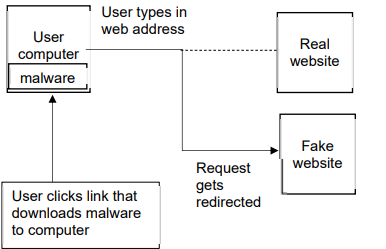
- Pharming is typing a website address into a browser and it being **redirected to a 'fake' website **in order to trick a user into typing in sensitive information such as passwords
- An attacker attempts to** alter DNS settings**, the directory of websites and their matching IP addresses that is used to access websites on the internet or change a users browser settings
- A user clicks a link which downloads malware
- The user types in a web address which is then redirected to the fake website
How can you protect against it?
-
To protect against the threat of pharming:
- Keep anti-malware software up to date
- Check URLs regularly
- Make sure the padlock icon is visible
Phishing
Spec point —
5.3.1· "1 Describe the processes involved in, and the aim of carrying out, a range of cyber security threats"
Phishing
What is phishing?
- Phishing is the process of sending fraudulent emails/SMS to a large number of people, claiming to be from a reputable company or trusted source
- Phishing is an attempt to try and gain access to your details, often by coaxing the user to click on a login button/link
Social Engineering
Spec point —
5.3.1· "1 Describe the processes involved in, and the aim of carrying out, a range of cyber security threats"
Social Engineering
What is social engineering?
-
Social engineering is exploiting weaknesses in a computer system by targeting the people that use or have access to them
-
There are many forms of social engineering, some examples include
- Fraudulent phone calls: pretending to be someone else to gain access to their account or their details
- Pretexting: A scammer will send a fake text message, pretending to be from the government or human resources of a company, this scam is used to trick an individual into giving out confidential data
-
People are seen as the weak point in a system because human errors can lead to significant issues, some of which include:
- Not locking doors to computer/server rooms
- Not logging their device when they're not using it
- Sharing passwords
- Not encrypting data
- Not keeping operating systems or anti-malware software up to date
Worked Example A company is concerned about a distributed denial of service (DDoS) attack.
(i) Describe what is meant by a DDoS attack.
[4]
(ii) Suggest one security device that can be used to help prevent a DDoS attack.[1]
Answers
(i) Any four from:
- multiple computers are used as bots
- designed to deny people access to a website
- a large number / numerous requests are sent (to a server) …
- … all at the same time
- the server is unable to respond / struggles to respond to all the requests
- the server fails / times out as a result.
(ii)
- firewall OR proxy server
Was this revision note helpful?
Build on this topic