Arrays (Cambridge International IGCSE Computer Science)
1-Dimensional Arrays
Spec point — "1 Declare and use one-dimensional (1D) and two-dimensional (2D) arrays 2 Understand the use of arrays 3 Write values into and read values from an array using iteration"
1-Dimensional Arrays
What is an array?
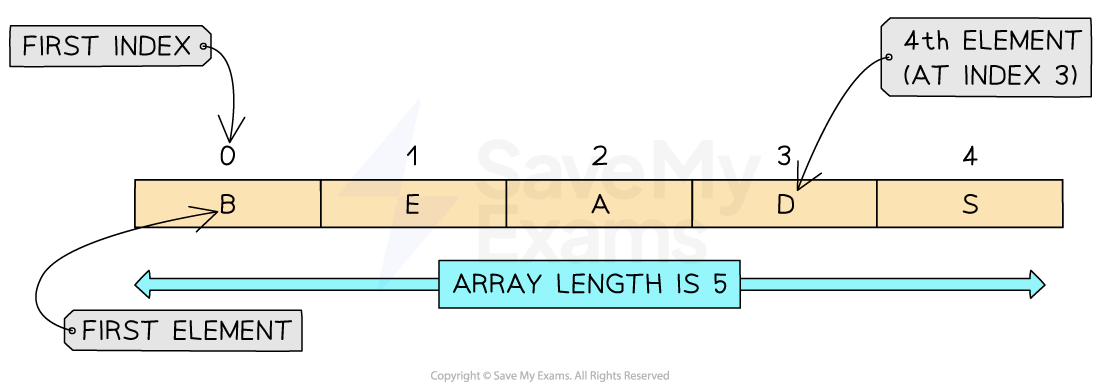
- An array is an ordered, **static set of elements **in a fixed-size memory location
- An array can only store** 1 data type**
- A 1D array is a linear array
- In languages such as Python, indexes start at 0, known as zero-indexed
- In CIE pseudocode, index's start at 1
| Concept | Pseudocode | Python |
|---|---|---|
| Create | DECLARE scores: ARRAY[1:5]OF INTEGER | scores = [] |
| Creates a blank array with 5 elements (1-5) | Creates a blank array | |
scores ← [12, 10, 5, 2, 8] | scores = [12, 10, 5, 2, 8] | |
| Creates an array called scores with values assigned | ||
| Assignment | colours[4] ← "Red" | colours[4] = "Red" |
| Assigns the colour "Red" to index 4 (4th element) | Assigns the colour "Red" to index 4 (5th element) |
Examples
Creating a one-dimensional array called ‘array’ which contains 5 integers.
- Create the array with the following syntax:
| Pseudocode | Python |
|---|---|
DECLARE MyArray : ARRAY[1:5] OF INTEGER | array = [1, 2, 3, 4, 5] |
- Access the individual elements of the array by using the following syntax:
| Pseudocode | Python |
|---|---|
MyArray[1] ← 1 | array[index] |
- Modify the individual elements by assigning new values to specific indexes using the following syntax:
| Pseudocode | Python |
|---|---|
MyArray[index] ← newValue | array[index] = newValue |
- Use the
lenfunction to determine the length of the array by using the following syntax:
| Pseudocode | Python |
|---|---|
| There is no built-in length function in CIE pseudocode. The array length is known from the declaration or stored in a variable. | len(array) |
- In the example the array has been iterated through to output each element within the array
- A for loop has been used for this
| Pseudocode |
|---|
| Python |
|---|
2-Dimensional Arrays
Spec point — "1 Declare and use one-dimensional (1D) and two-dimensional (2D) arrays 2 Understand the use of arrays 3 Write values into and read values from an array using iteration"
2-Dimensional Arrays
What is a 2-dimensional array?
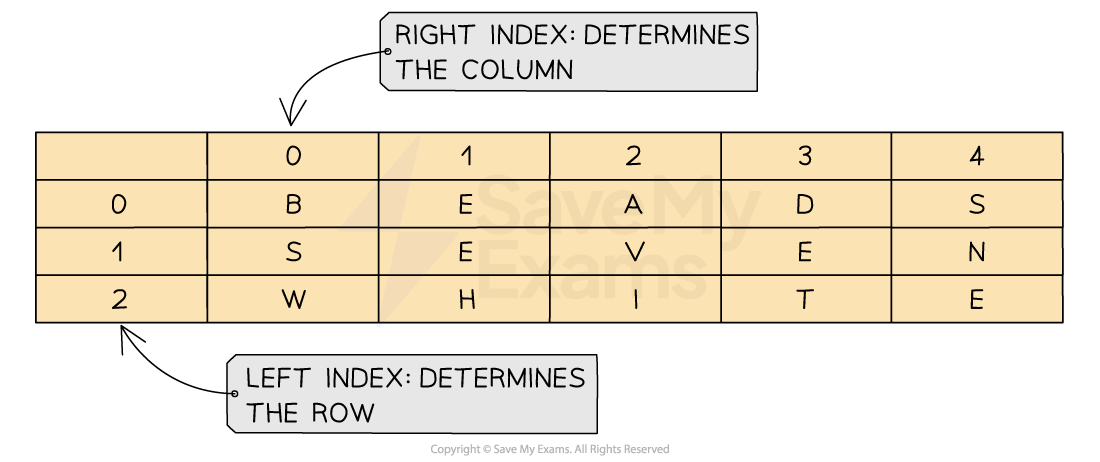
- A 2D array extends the concept on a 1D array by adding another dimension
- A 2D array can be visualised as a table with rows and columns
- When navigating through a 2D array you first have to go down the rows and then across the columns to find a position within the array
| Concept | Pseudocode | Python |
|---|---|---|
| Create | Declare a 2D array with name and number for 3 people | Creates a 3x2 blank array (3 people, each with name and number) |
DECLARE NamesAndNumbers : ARRAY[1:3, 1:2] OF STRING1:3 = 3 rows → one for each person1:2 = 2 columns → one for name, one for numberOF STRING → both names and phone numbers are stored as strings | NamesANDNumbers = [[None, None], [None, None], [None, None]] | |
Declare a 2D array calledplayerswithname andscoreassigned for 4 people (Alice, Bob, Charlie & Daisy) | ||
// Declare a 2D array with 4 rows and 2 columns (name and score)DECLARE players : ARRAY[1:4, 1:2] OF STRING// Assign values to each playerplayers[1,1] ← "Alice"players[1,2] ← "25"players[2,1] ← "Bob"players[2,2] ← "30"players[3,1] ← "Charlie"players[3,2] ← "22"players[4,1] ← "Daisy"players[4,2] ← "28" | # Each player has a name and a scoreplayers = [ ["Alice", 25], ["Bob", 30], ["Charlie", 22], ["Daisy", 28]] | |
| Assignment | Assigning the nameHollyto replace the nameCharlie | |
players[3,1] ← "Holly" | players[2][0] = "Holly" # Charlie is at index 2 (third row), name is at index 0 |
Examples
- Initialising a 2D array with 3 rows and 3 columns, with the specified values
| Pseudocode |
|---|
| Python |
|---|
Iterating through a 2-dimensions array
- When iterating through a 2D array, a nested
FOR...NEXTloop can be used - Nested iteration to access items in the 2D array
| Pseudocode |
|---|
| Python |
|---|
Exam Hint In the exam, the question will always give an example to demonstrate which order the array is being read from.
Some questions can be X,Y and others can be Y, X. Always refer to the example before giving your answer!
Worked Example A parent records the length of time being spent watching TV by 4 children
Data for one week (Monday to Friday) is stored in a 2D array with the identifier
minsWatched.The following table shows the array
Quinn Lyla Harry Elias 0 1 2 3 Monday 0 34 67 89 78 Tuesday 1 56 43 45 56 Wednesday 2 122 23 34 45 Thursday 3 13 109 23 90 Friday 4 47 100 167 23 Elias watched 78 minutes of TV on Monday:
- Identify the row for Monday: Row
0.- Identify the column for Elias: Column
3.- Find the value at
minsWatched[0][3]: The value is78Write a line of code to output the number of minutes that Lyla watched TV on Tuesday [1]
Write a line of code to output the number of minutes that Harry watched TV on Friday [1]
Write a line of code to output the number of minutes that Quinn watched TV on Wednesday [1]
Answers
print(minsWatched[1][1]ORprint(minsWatched[1,1]print(minsWatched[4][2]ORprint(minsWatched[4,2]print(minsWatched[2][0]ORprint(minsWatched[2,0]
Was this revision note helpful?
Build on this topic