How to Answer Trace Table Questions (Cambridge International IGCSE Computer Science)
Exam board Cambridge International · IGCSEUpdated 2025-08-12
How do I answer a CIE IGCSE Computer Science trace table question?
What is a trace table?
- Trace tables are used to follow the values of variables as a program runs
- These questions test your ability to simulate code line by line and accurately record outputs
Exam Hint
- You must read the code carefully and simulate it exactly as a computer would
- Use a pencil and annotate each step
- The most common mistake is skipping or misreading a line
What you need to know
- You may be asked to complete a trace table, explain a trace table, or spot errors in output
- These questions are normally worth 3–6 marks
- Most commonly appear in questions involving iteration, selection, and arrays/lists
- In most cases, the structure of the table is provided, your task is to complete the missing values
Command words to look out for
| Command word | What it means |
|---|---|
| Complete | Fill in the table with correct values |
| State | Give the value/output/result (usually a single word or number) |
| Explain | Say why something happens or changes in the program |
| Identify | Spot where something goes wrong or doesn't match expectations |
How to tackle a trace table question
Follow these steps to answer trace table questions accurately:
- Read the code carefully Understand what each line does Look out for loops, IF statements, and variable changes
- Use the trace table provided Use the headings and row count to guide how many iterations or steps are needed
- Work line by line Simulate the program in your head or on paper Update each variable after every change
- Watch out for variable resets Variables declared inside loops often reset every time, don’t carry the wrong value across iterations
- Show the final output clearly If you're asked for the output, make sure it’s written exactly as it would appear on screen
Worked example
| Question | |
|---|---|
| This algorithm inputs three numbers and calculates the total if they are greater than 10: Complete the trace table below when the inputs are: 12, 8, 15 You may not need to use all the rows in the table | Line number | count | number | total | Output ||---|---|---|---|---| | | | | | | | | | | | | | | | | | | | | | | | | | | | | | | | | | | | | | | | | | | | | | | | | | | | | | | | | | | | | | | | | | | | | | | | | | | | | | | | | | | | | | | | | | | | |
| 1. Read the code carefully | |
- Line 1: Sets total to 0- Line 2: Sets count to 1- Lines 3–9: Loop runs 3 times (count from 1 to 3) - Each time, a number is input - If it’s greater than 10, it’s added to total- Then count increases by 1- Line 10: Outputs the final total after the loop finishes | |
| 2. Use the trace table provided | |
| - The trace table includes 15 rows, one for each step where a variable changes - You should use a new row whenever a variable or output changes - If you only use 5–6 rows, something’s probably missing | |
| 3. Work line by line | |
03 WHILE count ≤ 3 | count = 1 → loop runs |
04 number ← INPUT | User inputs 12 |
05 IF number > 10 THEN | 12 > 10 → go to line 6 |
06 total ← total + number | total becomes 12 |
08 count ← count + 1 | count becomes 2 |
03 WHILE count ≤ 3 | count = 2 → loop runs |
| 4. Watch out for variable resets | |
- number changes each time new input is entered- total only changes if the input is greater than 10- count increases on every loop- There are no nested loops, so trace line by line in order | |
| 5. Show the final output clearly | |
| The output is 27 | |
| Final answer: Final answer | |
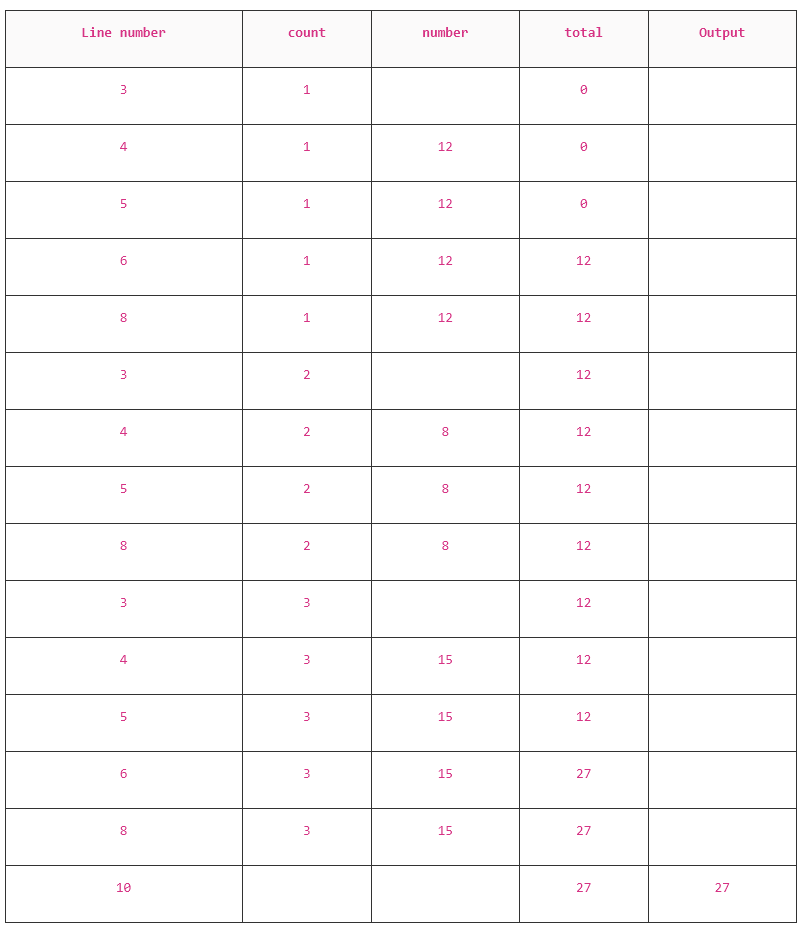 |
Exam Hint
- You don’t need to fill in Line 7 or Line 9, they just mark the end of IF and WHILE
- Use a dash (–) when a column isn’t relevant
- Keep your trace table neat, it’s easy to lose marks if your working is hard to follow
- If you're writing by hand, add short notes in the margin to explain any changes
Was this revision note helpful?
Build on this topic