Network topologies (Cambridge International AS Computer Science)
What is a network topology?
-
A network topology is the physical structure of the network
-
It defines how the network hardware will be arranged to create the network
-
Topologies to understand for the exam are:
- Star topology
- Bus topology
- Mesh topology
- Hybrid topology
Bus
What is a bus topology?
-
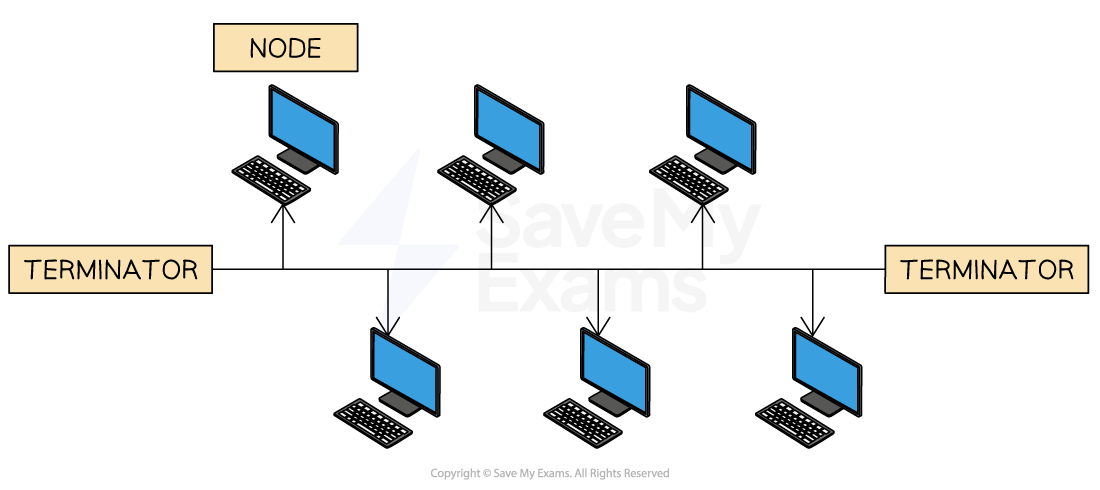
A bus topology is all devices connected by one single ‘bus’ cable, terminated at each end
-
The terminators stop the signal bouncing back and causing errors
-
A bus topology works by each device:
- ‘Listening’ to electrical signals
- Checking data packets for their specific address
- Ignoring data packets it does not recognise
-
A bus topology has been replaced by much more efficient network topologies such as the star topology
Bus topology - advantages vs disadvantages
| Advantages | Disadvantages |
|---|---|
| Easy and cheap to set up – only one cable is needed | Low security – data is visible to all devices |
| Does not rely on other network hardware (e.g. central server or switch) | Slow data transfer – prone to data collisions |
| If the cable breaks, the whole network is affected (central point of failure) |
Star
Spec point —
2.1.5
What is a star topology?
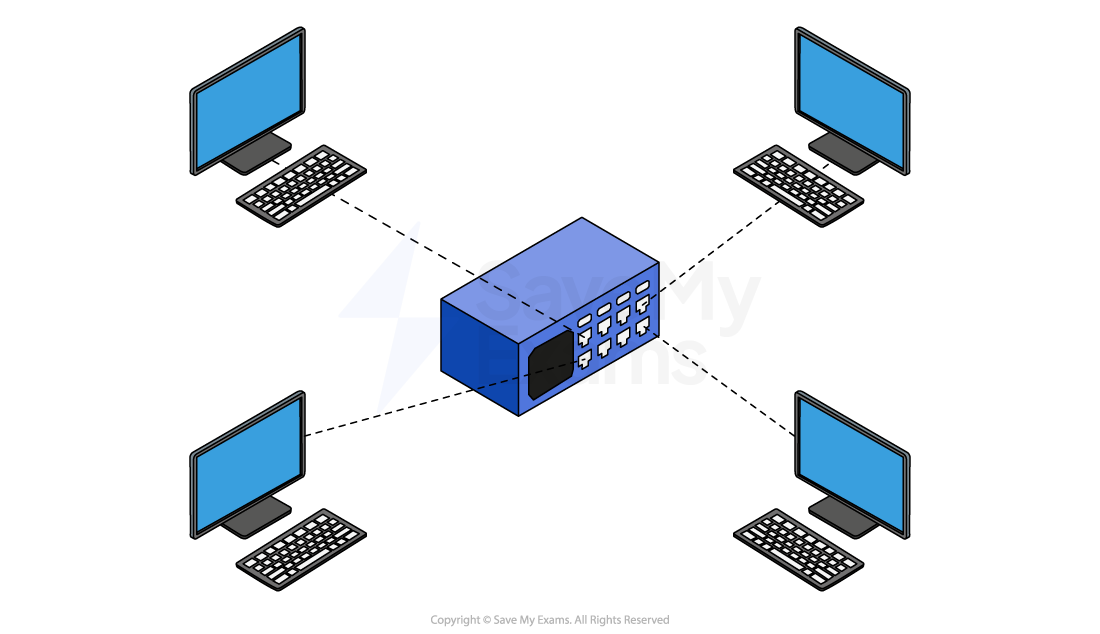
- A star topology has a central switch which all other devices connect to
- A switch is an intelligent device which ensures that traffic only goes to the intended device
- A star topology is commonly seen in most homes, businesses, organisations and schools
-
Traffic (packets) on a star topology is handled differently depending on the device used as the central node
- A hub will send traffic to all devices on the network, if the address in the packet matches a device it will be accepted, otherwise it is ignored
- A switch will only send traffic to devices on the network where the address in the packet is a match
Star topology - advantages vs disadvantages
| Advantages | Disadvantages |
|---|---|
| If one cable fails, the rest of the network still works | The central switch is a single point of failure |
| A problem with one device (e.g. a school computer) won’t affect others | If the switch stops working, all devices lose connection to the network and its resources |
| More reliable than other topologies like bus or ring | Can be expensive to install due to the switch and extra cabling (not mentioned but useful add-on) |
Mesh
Spec point —
2.1.5
What is a mesh topology?
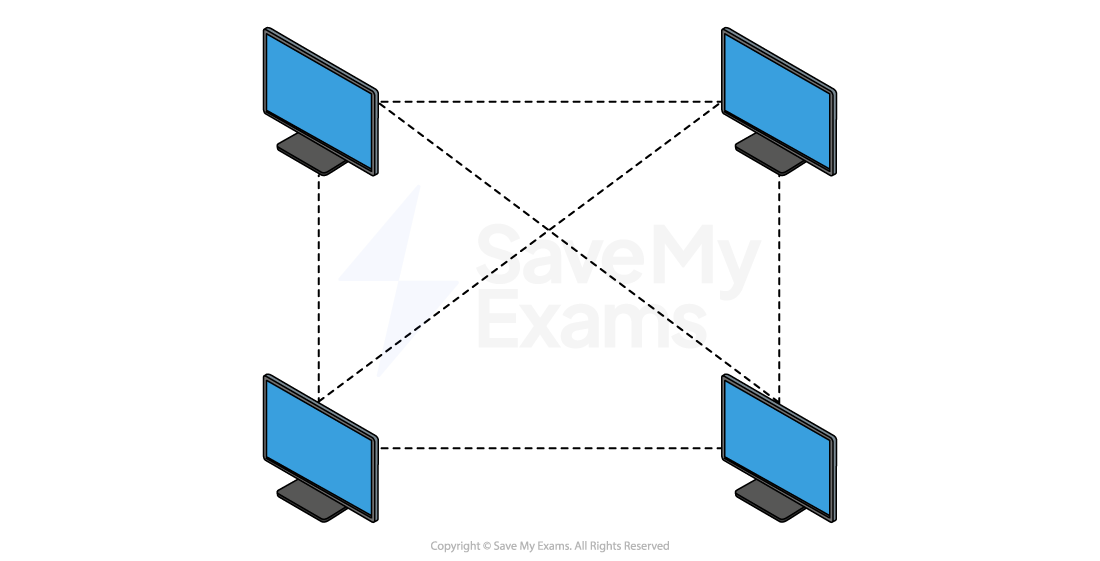
- A mesh topology allows all computers to be connected to all other computers
- This is known as a full mesh network topology
- LANs can make use of mesh networks however, they are more commonly seen in IoT devices such as wearable technology and smart home* devices
-
Traffic (packets) on a mesh topology can follow two different methods:
- Routing- devices are given routing logic (act like a router) to ensure packets are sent to the correct device in the shortest route
- Flooding- all packets are sent to all devices using no routing logic, this can lead to network flooding causing performance issues
Mesh topology - advantages vs disadvantages
| Advantages | Disadvantages |
|---|---|
| If one cable fails, the network still works – data can use an alternate route | Requires lots of hardware, cables, and switches |
| Provides high fault tolerance – multiple paths for data to travel | High cost to set up due to the amount of equipment needed |
| Very reliable – good for critical systems | Hard to scale – adding new devices is more complex than in a star topology |
| A partial mesh topology is often used as a more practical and cost-effective alternative |
Hybrid
Spec point —
2.1.5
What is a hybrid topology?
-
A hybrid topology is a mix of two of more different network topologies
-
For example, bus & star, star & mesh etc
-
A typical use of a hybrid topology would be when there is a need to join different networks together
-
Imagine a large education trust takes over three schools: School A, School B, and School C.
- School A uses a bus topology to connect classroom computers with a simple shared cable
- School B uses a star topology to link all devices to a central switch in the IT room
- School C uses a mesh topology to make sure every building (e.g. science block, library) stays connected, even if one cable fails
-
When the trust wants to connect all three schools into a single network, it uses a hybrid topology
-
This allows:
- Each school to keep its own existing setup (bus, star, or mesh)
- The schools to be linked together efficiently
- Easy expansion, such as adding a new school or admin office without changing everything
- The network to be more flexible and reliable, using the strengths of each topology
Hybrid topology - advantages vs disadvantages
| Advantages | Disadvantages |
|---|---|
| Combines the strengths of multiple topologies (e.g. reliability of mesh, simplicity of bus) | Complex to design – needs careful planning to combine different topologies |
| Flexible– different parts of the network can be optimised for different needs | Expensive– more hardware and maintenance may be needed |
| Scalable– new segments (e.g. a new site or building) can be added without changing the whole setup | Troubleshooting can be harder– different parts use different systems and rules |
| Reliable– failures in one part don’t necessarily affect the rest of the network |
Was this revision note helpful?