Assembly language basics (Cambridge International AS Computer Science)
Exam board Cambridge International · ASUpdated 2025-04-08
Machine code vs assembly
What is machine code?
- Machine code is a first-generation language
- Instructions are directly executable by the processor
- Written in binary code
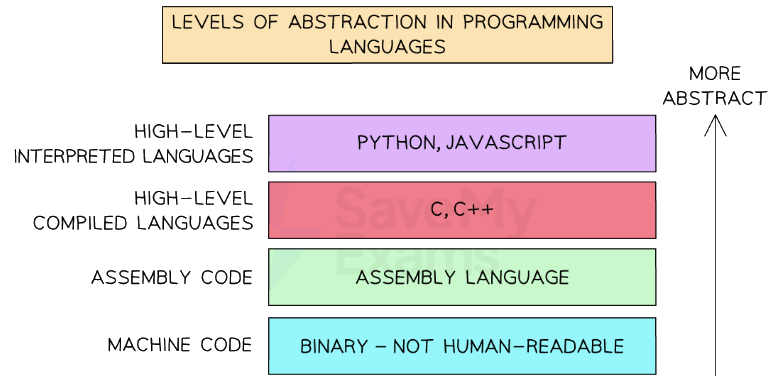
Levels of Abstraction of Programming Languages
What is assembly?
- Assembly code is a second-generation language
- The code is written using mnemonics, abbreviated text commands such as LDA (Load), STA(Store)
- Using this language programmers can write human-readable programs that correspond almost exactly to machine code
- One assembly language instruction translates to one machine code instruction
- Needs to be translated into machine code for the computer to be able to execute it
- Each type of computer CPU has a specific instruction set
Instruction set
- An instruction set is a list of all the commands that can be processed by a CPU
- Each command has a binary code which is the machine code
- In assembly the binary code is written using mnemonics and split into an opcode and operand
- The opcode is the part of an instruction that tells the CPU what operation to perform
- It's short for "operation code"
- Example operations: LDA (load), STA (store), ADD, INP, OUT, BRZ, BRA
- The operand is the data or memory address the opcode will work with
- It gives the extra detail the CPU needs to complete the instruction
- Often used to specify a memory address, a value, or a label
| Opcode | Operand | Explanation |
|---|---|---|
LDM | #n | Immediate addressing. Load the number n to the accumulator (ACC). |
LDD | <address> | Direct addressing. Load the contents of the location at the given address to ACC. |
LDI | <address> | Indirect addressing. Use the value at the given address as a new address. Load contents to ACC. |
LDX | <address> | Indexed addressing. Use <address> + index register to get the final address. Load to ACC. |
LDR | #n | Immediate addressing. Load the number n to the index register (IX). |
MOV | <register> | Move the contents of ACC to the given register (e.g. IX). |
STO | <address> | Store the contents of ACC at the given memory address. |
ADD | <address> | Add the contents of the given address to ACC. |
SUB | <address> | Subtract the contents of the given address from ACC. |
INC | <register> | Increment the contents of the register (ACC or IX) by 1. |
DEC | <register> | Decrement the contents of the register (ACC or IX) by 1. |
JMP | <address> | Unconditional jump to the given address. |
CMP | <address> | Compare the contents of ACC with the contents of the given address. |
CMP | #n | Compare the contents of ACC with the number n. |
CMI | <address> | Indirect addressing. Compare ACC with the contents at the address stored in <address>. |
JPE | <address> | Jump to <address> if the previous compare result was true (equal). |
JPN | Jump to <address> if the previous compare result was false (not equal). | |
IN | Take input from the keyboard and store its ASCII value in ACC. | |
OUT | Output to the screen the character stored in ACC. | |
END | End the program and return control to the operating system | |
All questions will assume there is only one general purpose register available (Accumulator)ACC denotes AccumulatorIX denotes Index Register<address> can be an absolute or symbolic address# denotes a denary number, e.g. #123B denotes a binary number, e.g. B01001010& denotes a hexadecimal number, e.g. &4A |
Was this revision note helpful?
Build on this topic