Number systems (Cambridge International AS Computer Science)
Number bases
What is a number base?
- A number base is the number of different digits or symbols a number system uses to represent values
- Each place in a number represents a power of the base, starting from the right
Denary
- Denary is a number system that is made up of 10 digits (0-9)
- Denary is referred to as a base-10 number system
- Each digit has a weight factor of 10 raised to a power, the rightmost digit is 1s (100), the next digit to the left 10s (101) and so on
- Humans use the denary system for counting, measuring and performing maths calculations
- Using combinations of the 10 digits we can represent any number
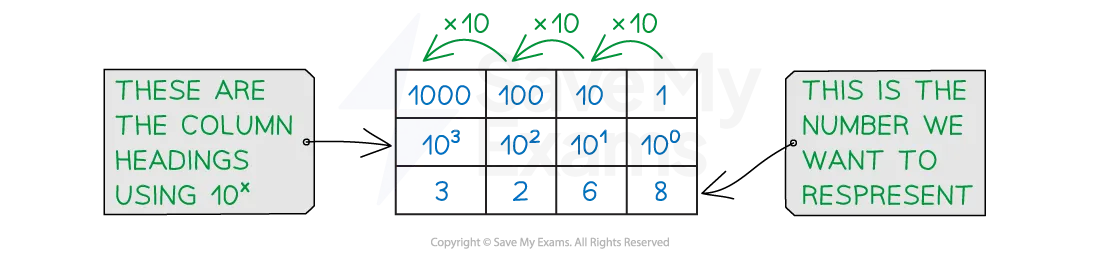
- In this example, (3 x 1000) + (2 x 100) + (6 x 10) + (8 x 1) = 3268
- To represent a bigger number we add more digits
Binary
- Binary is a number system that is made up of two digits (1 and 0)
- Binary is referred to as a base-2 number system
- Each digit has a weight factor of 2 raised to a power, the rightmost digit is 1s (20), the next digit to the left 2s (21) and so on
- Each time a new digit is added, the column value is multiplied by 2
- Using combinations of the 2 digits we can represent any number
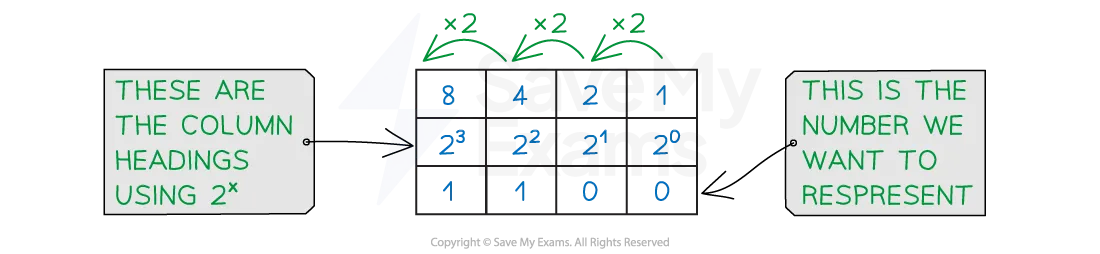
- In this example, Binary 1100 = (1 x 8) + (1 x 4) = 12
- To represent bigger numbers we add more binary digits (bits)
| 32,768 | 16,384 | 8,192 | 4,096 | 2,048 | 1,024 | 512 | 256 | 128 | 64 | 32 | 16 | 8 | 4 | 2 | 1 |
|---|---|---|---|---|---|---|---|---|---|---|---|---|---|---|---|
| 215 | 214 | 213 | 212 | 211 | 210 | 29 | 28 | 27 | 26 | 25 | 24 | 23 | 22 | 21 | 20 |
Hexadecimal
- Hexadecimal is a number system that is made up of 16 digits, 10 numbers (0-9) and 6 letters (A-F)
| 0 | 1 | 2 | 3 | 4 | 5 | 6 | 7 | 8 | 9 | 10 | 11 | 12 | 13 | 14 | 15 |
|---|---|---|---|---|---|---|---|---|---|---|---|---|---|---|---|
| 0 | 1 | 2 | 3 | 4 | 5 | 6 | 7 | 8 | 9 | A | B | C | D | E | F |
- Hexadecimal is referred to as a base-16 number system
- Each digit has a weight factor of 16 raised to a power, the rightmost digit is 1s (160), the next digit to the left 16s (161)
| 16s | 1s | |
|---|---|---|
| 1 | 3 | |
| 1 x16 | 3 x 1 | = 19 |
- A quick comparison table demonstrates a relationship between hexadecimal and a binary nibble
- One hexadecimal digit can represent four bits of binary data
| Denary | Binary | Hexadecimal |
|---|---|---|
| 0 | 0000 | 0 |
| 1 | 0001 | 1 |
| 2 | 0010 | 2 |
| 3 | 0011 | 3 |
| 4 | 0100 | 4 |
| 5 | 0101 | 5 |
| 6 | 0110 | 6 |
| 7 | 0111 | 7 |
| 8 | 1000 | 8 |
| 9 | 1001 | 9 |
| 10 | 1010 | A |
| 11 | 1011 | B |
| 12 | 1100 | C |
| 13 | 1101 | D |
| 14 | 1110 | E |
| 15 | 1111 | F |
Binary to denary & denary to binary
- Binary numbers can be converted into denary and vice-versa
- For example the 8-bit binary number 01101001 can be converted into denary using the following method:
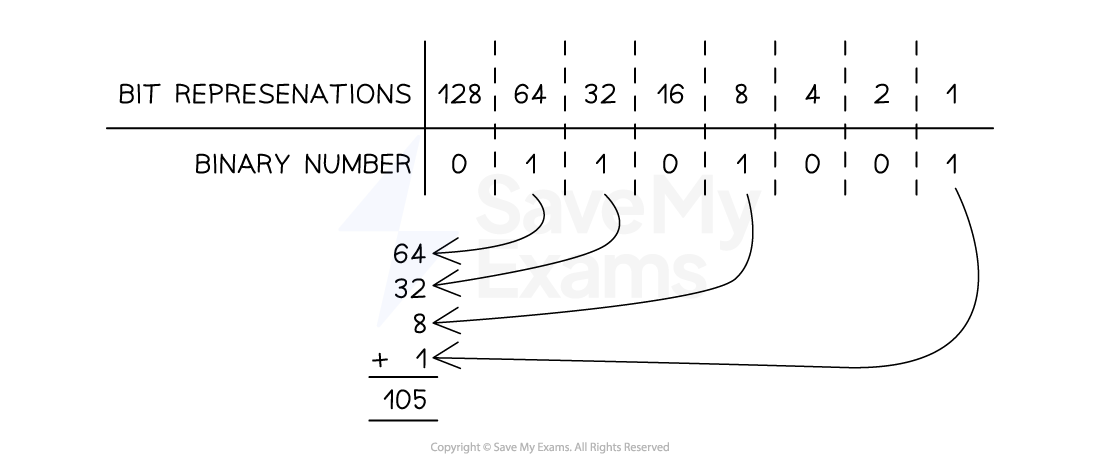
Binary to denary conversion
- Therefore the 8-bit binary number 01101001 is 105 as a denary value
- To convert the denary number 101 to binary, we firstly write out binary number system
| 128 | 64 | 32 | 16 | 8 | 4 | 2 | 1 |
|---|---|---|---|---|---|---|---|
-
Then we start at the left and look for the highest number that is less than or equal to 101 and if so, place a 1 in that column
-
Otherwise, place a 0 in the column
-
128 is bigger than 101 and therefore we place a 0 in that column
-
64 is smaller than 101 so we place a 1 in that column
- 101 - 64 = 37
- This now means we have 37 left to find
-
32 is smaller than 37 so we place a 1 in that column
- 37 - 32 = 5
- This now means we have 5 left to find
-
16 is bigger than 5 and therefore we place a 0 in that column
-
8 is bigger than 5 and therefore we place a 0 in that column
-
4 is smaller than 5 so we place a 1 in that column
- 5 - 1 = 1
- This now means we have 1 left to find
-
2 is bigger than 1 and therefore we place a 0 in that column
-
1 is equal to the number we have left so we place a 1 in that column
-
64 + 32 + 4 + 1 = 101
- Therefore the denary number 101 in binary is 01100101
| 128 | 64 | 32 | 16 | 8 | 4 | 2 | 1 |
|---|---|---|---|---|---|---|---|
| 0 | 1 | 1 | 0 | 0 | 1 | 0 | 1 |
Hexadecimal to denary & denary to hexadecimal
-
To convert the denary number 163 to hexadecimal, start by dividing the denary value by 16 and recording the whole times the number goes in and the remainder
-
163 ➗16 = 10 remainder 3
-
In hexadecimal the whole number = digit 1 and the remainder = digit 2
-
Digit 1 = 10 (A)
-
Digit 2 = 3
-
Denary 163 is A3 in hexadecimal
-
To convert the hexadecimal number 79 to denary, start by multiplying the first hexadecimal digit by 16
-
7 ✖ 16 = 112
-
Add digit 2 to the result
-
112 + 9 = 121
-
Hexadecimal 79 is 121 in denary
Binary to hexadecimal & hexadecimal to binary
- To convert the binary number 10110111 to hexadecimal, first split the 8 bit number into 2 binary nibbles
| 8 | 4 | 2 | 1 | 8 | 4 | 2 | 1 | |
|---|---|---|---|---|---|---|---|---|
| 1 | 0 | 1 | 1 | 0 | 1 | 1 | 1 |
-
For each nibble, convert the binary to it’s denary value
-
(1 x 8) + (1 x 2) + (1 x 1) = 11 (B)
-
(1 x 4) + (1 x 2) + (1 x 1) = 7
-
Join them together to make a 2 digit hexadecimal number
-
Binary 10110111 is B7 in hexadecimal
-
To convert the hexadecimal number 5F to binary, first split the digits apart and convert each to a binary nibble
| 8 | 4 | 2 | 1 | |
|---|---|---|---|---|
| 0 | 1 | 0 | 1 | = 5 |
| 8 | 4 | 2 | 1 | |
|---|---|---|---|---|
| 1 | 1 | 1 | 1 | = 15 (F) |
- Join the 2 binary nibbles together to create an 8 bit binary number
| 128 | 64 | 32 | 16 | 8 | 4 | 2 | 1 |
|---|---|---|---|---|---|---|---|
| 0 | 1 | 0 | 1 | 1 | 1 | 1 | 1 |
- Hexadecimal 5F is 01011111 in binary
Worked Example Convert the positive binary integer 1010 0010 into hexadecimal. [1]
Final answer: Answer
- A2 [1 mark]
Binary Coded Decimal (BCD)
Spec point —
1.1.4
What is Binary Coded Decimal?
- Binary coded decimal is a number system that uses 4 bit codes to represent each denary digit (0-9)
| BCD | Denary digit |
|---|---|
| 0000 | 0 |
| 0001 | 1 |
| 0010 | 2 |
| 0011 | 3 |
| 0100 | 4 |
| 0101 | 5 |
| 0110 | 6 |
| 0111 | 7 |
| 1000 | 8 |
| 1001 | 9 |
-
To represent the denary number 2500 in BCD format would be:
- **2500 **= 0010 0101 0000 0000
-
BCD can be stored in a computer as either half a byte (4 bits) or as** two 4 bit codes** joined to from a byte (8 bits)
Four single bytes
| 0 | 0 | 0 | 0 | 0 | 0 | 1 | 0 | = 2 |
|---|---|---|---|---|---|---|---|---|
| 0 | 0 | 0 | 0 | 0 | 1 | 0 | 1 | = 5 |
| 0 | 0 | 0 | 0 | 0 | 0 | 0 | 0 | = 0 |
| 0 | 0 | 0 | 0 | 0 | 0 | 0 | 0 | = 0 |
Two bytes
| 0 | 0 | 1 | 0 | 0 | 1 | 0 | 1 | = 2, 5 |
|---|---|---|---|---|---|---|---|---|
| 0 | 0 | 0 | 0 | 0 | 0 | 0 | 0 | = 0, 0 |
One's & two's complement
What is one's complement?
- One's complement is a method of representing both positive and negative numbers
- To turn a positive binary number in to a negative the positive binary number is inverted (0 becomes 1 and 1 becomes 0)
| 0 | 1 | 0 | 0 | 1 | 0 | 0 | 0 | = 72 |
|---|---|---|---|---|---|---|---|---|
| 1 | 0 | 1 | 1 | 0 | 1 | 1 | 1 | = -72 |
- The issue with one's complement is that it can have two representations for 0(positive and negative)
Exam Hint Be careful not to confuse one’s complement with two’s complement. In one’s complement, you just invert the bits to get the negative version, you don’t treat the MSB as negative like you would in two’s complement. That’s a different system!
What is two's complement?
-
Two's complement is another method of representing both positive and negative numbers
-
To turn a positive binary number into a negative:
- Positive binary number is inverted
- '1' is added to the right most bit
-
Using two's complement the leftmost bit is designated the most significant bit (MSB)
-
To represent negative numbers this bit must equal 1, turning the column value into a negative
-
Working with 8 bits, the 128 column becomes -128
| -128 | 64 | 32 | 16 | 8 | 4 | 2 | 1 | |
|---|---|---|---|---|---|---|---|---|
| 0 | 1 | 0 | 0 | 1 | 0 | 0 | 0 | = 72 |
| invert | ||||||||
| 1 | 0 | 1 | 1 | 0 | 1 | 1 | 1 | |
| add 1 | ||||||||
| 1 | + | |||||||
| result | ||||||||
| 1 | 0 | 1 | 1 | 1 | 0 | 0 | 0 | = -72 |
-
8 bit two's complement can represent values between 0111 1111 (+127) and 1000 0000 (-128)
-
An alternative way of thinking about this is:
-
Starting from the right, keep all the bits the same up to and including the first 1
-
Flip the rest of the digits
- 0101 1000 becomes...
- 1010 1000
-
Key reasons to use two's complement
-
Consistency
- You don’t need different rules for signed and unsigned numbers
- Whether you're adding +37 and +58, or −37 and +58, or −37 and −58, the binary addition process is the same
- Two’s complement works for any combination of positive and negative values
-
Hardware simplicity
-
CPUs are built to do simple binary addition
-
Two’s complement means:
- The same adder circuit can handle everything
- No special logic is needed to detect signs or subtract manually
-
-
It still works, up to a point
- As long as the sum doesn't exceed the max value (+127 in 8-bit), you can add two positive numbers with two’s complement without any issues
Worked Example Convert the denary number 649 into Binary Coded Decimal (BCD) [1]
Final answer: Answer
- 0110 0100 1001 [1 mark]
Was this revision note helpful?
Build on this topic