Utility Software (Cambridge International A-Level Computer Science)
Utility software
What is utility software?
-
Utility software is a collection of tools designed to help maintain a computer system
-
Utility software is designed to perform a limited number of tasks
-
Utility software interacts with the computers hardware, for example, secondary storage devices
-
Some utility software comes installed with the operating system
-
Examples of utility software include:
- Disk formatter
- Virus checker
- Defragmentation software
- Disk contents analysis/disk repair software
- File compression
- Back-up software
Disk formatter
-
A disk formatter prepares a storage device (like a hard drive or USB stick) for use by creating a file system and organising the space into sectors and tracks
-
It is needed:
- To wipe and re-initialise a disk before use
- To change the file system format (e.g. FAT32, NTFS)
- To remove all data and errors before installing a new OS or reusing the drive
-
For example:
- Formatting a new external drive before saving files
- Reformatting a corrupted USB stick to make it usable again
Virus checker
-
Virus checking software is a combination of different software to prevent computers from being susceptible to viruses and other malicious software
-
It typically includes:
- Anti-virus
- Anti-spam
- Anti-spyware
-
A virus checker scans through email attachments, websites and downloaded files to search for issues
-
Two ways virus checkers can approach the task are:
-
Use a list of known unique malware fingerprints (signatures) to block immediately if they try to access your device in any way
-
Monitor the behaviour of programs to identify suspicious activities that might indicate malware such as;
- Rapid deletion/modification of files
- Attempts to access sensitive data/resources
- Communicating with known malicious servers
-
-
Virus checkers will also perform checks for updates to ensure the database of signatures is up to date
Defragmentation software
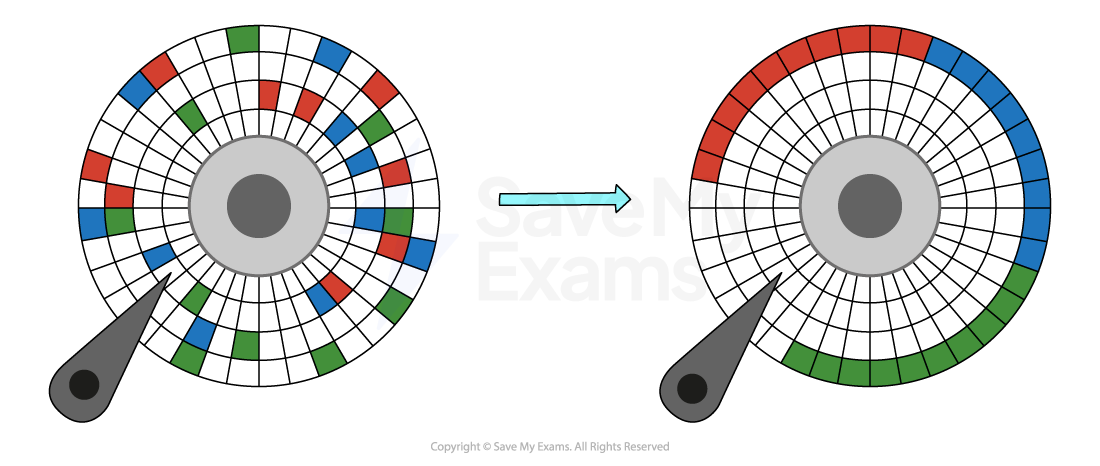
- Defragmentation software groups fragmented files back together in order to **improve the access speed **of a hard disk drive (HDD)
- As programs and data are added to a new hard disk drive, it is added in order,** over time as files are deleted this leaves gaps**
- As programs and data are added over time, these gaps get filled and data becomes fragmented
- Defragmentation can only be used on magnetic storage
Disk contents analysis/disk repair software
-
This utility checks the structure and health of a disk, including files, folders, sectors, and the file allocation table
-
It is needed:
- To diagnose and fix errors on the disk (e.g. bad sectors, file system corruption)
- To recover lost or damaged files
- To improve system performance by identifying and repairing issues
-
For example:
- Running Check Disk (chkdsk) on Windows to repair file system errors
- Using a disk utility on macOS to verify and repair drive problems
File compression
- Compression reduces the amount of secondary storage required by performing an algorithm on the original data
- Lossy compression physically removes data from the original data to reduce its size, the original file can not be re-created
- Lossless compression uses mathematics to order data more efficiently reducing its size, the original files can be re-created as no data is lost
Back-up software
-
Back-up software is used to create copies of personal data in order to keep it safe in the event of:
- Accidental loss
- Data theft
-
Backups can be automated and scheduled to happen at less busy periods of the day, to not take up valuable system resources (e.g. overnight etc.)
-
Backups can be made in two ways:
- Full- all files are backed up (saftest, slow)
- Incremental- only files that have been added/modified since the last backup are backed up (faster, less secure)
-
Backups can be stored locally(secondary storage) or remotely (cloud)
-
Backup software can be purchased or come as a standalone application bundled with an operating system
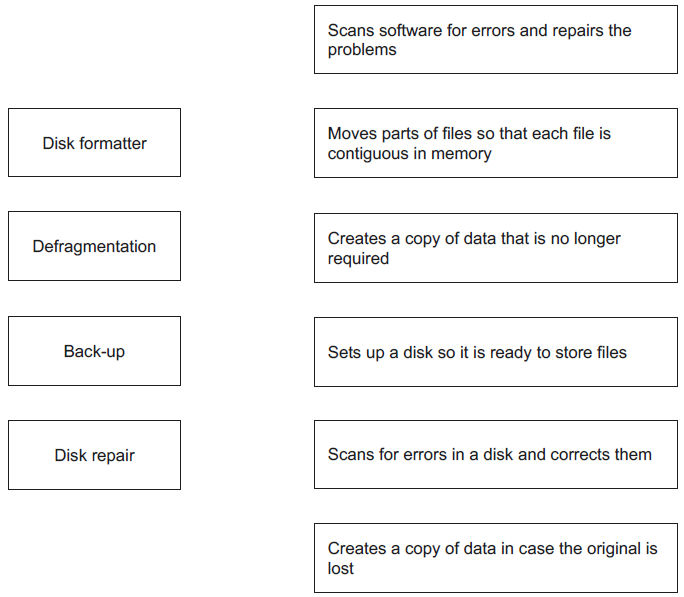
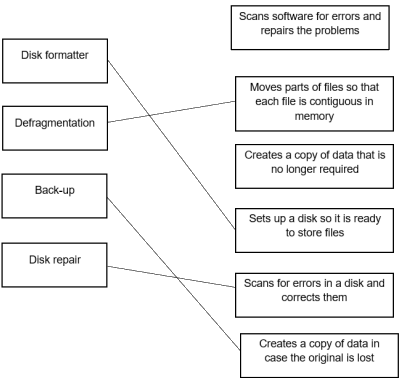
Worked Example Draw one line from each utility software to its correct description.
Utility software Description
[4]
Final answer: Answer
Was this revision note helpful?
Build on this topic